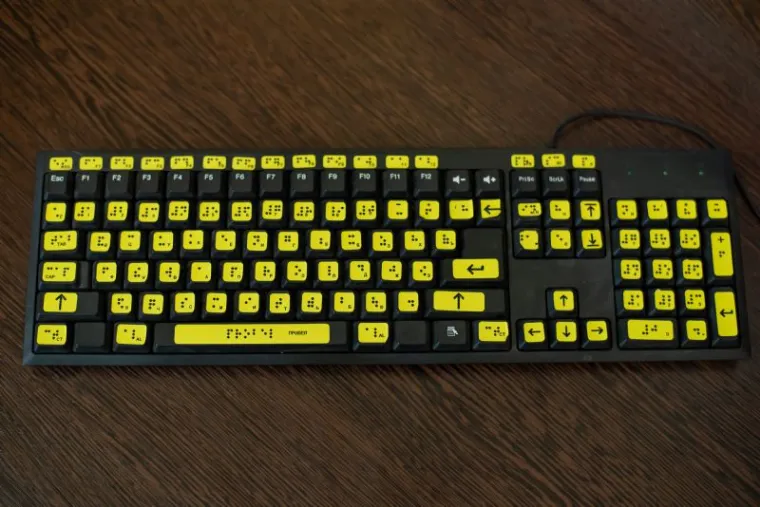
Choosing the right braille keyboard can make a world of difference for young students with visual impairments. Matching the right assistive technology tool to the student’s abilities, environment, and tasks can open new doors for learning and independence. Whether students are beginning braille literacy or working toward more fluent typing, each braille keyboard offers specific benefits based on their developmental needs.
A braille keyboard is a specially adapted keyboard designed to assist individuals who are blind or have low vision. Unlike a traditional QWERTY keyboard, a braille keyboard may either include braille dots on each key or offer an entirely tactile-based layout using braille cells. Some models simply add braille labels to traditional keys, while others integrate larger print, high-contrast designs, or voice outputs to support learners with varying degrees of vision loss.
Braille keyboards are used by students, professionals, and adults who need tactile access to computers, tablets, or other digital devices. They are essential for literacy development, communication, and building technical skills necessary for academic success and independent living.
A braille keyboard works by allowing users to input characters using combinations of raised dots that correspond to braille cells. In standard braille keyboards, each key represents one dot in the braille cell (dots 1 through 6 or 1 through 8). Pressing combinations of keys produces Braille letters, numbers, or commands. In QWERTY-style braille keyboards, users rely on tactile braille markings on each key, enabling them to type using standard typing methods while referencing braille for navigation.
~1.jpg&newwidth=365&maxheight=200 "Slimline Large Print Keyboard by Logickeyboard") | Slimline Large Print Keyboard by Logickeyboard View Product |
If you’re looking for an introductory tool to build familiarity with typing before full braille literacy, the Slimline Large Print Keyboard by Logickeyboard is a fantastic choice. It features oversized keys with bold, high-contrast lettering, color-coded by function. Although it doesn’t have braille dots, it sets up younger learners for success with early typing activities while reinforcing fine motor skills and spatial orientation on a keyboard.
Best for: Early learners developing keyboard familiarity before transitioning to braille.
 | Braille Keyboard for Mac Computers with USB Hubs - ALBA Slimline from Logickeyboard View Product |
Designed specifically for Mac users, the Braille ALBA Slimline Keyboard offers tactile braille labeling directly on each key with excellent durability. Its slim, quiet profile and soft-touch scissor-switch keys make it ideal for students who fatigue quickly during longer typing tasks. Bonus: it has two built-in USB ports, making it easier to connect adaptive devices or storage drives.
Best for: Mac users needing a dedicated braille tactile keyboard.
 | Logickeyboard Braille Keyboard with Large Print for PC and Mac View Product |
The Logickeyboard Braille Keyboard with Large Print is a dual-sensory powerhouse. It offers both braille dots and oversized print on each key, making it ideal for students who have some usable vision but are building tactile skills. Its Bluetooth wireless connection supports learning across multiple devices like tablets, laptops, and desktops, a major advantage for mobile classrooms.
Best for: Students needing both large print and braille across multiple devices.
 | Braille Low Vision Keyboard Labels View Product |
If a dedicated braille keyboard isn’t in the budget yet, the Braille Keyboard Labels are a practical starter tool. These adhesive labels can be applied to any standard keyboard, instantly converting it into a tactile-accessible device. They’re a great choice for introducing braille typing to emerging learners without requiring a full equipment swap.
Best for: Adding braille to existing keyboards in classrooms.
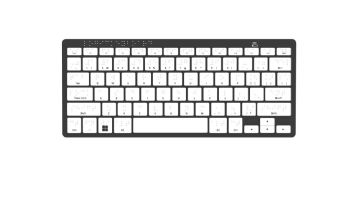 | Wireless Braille Keyboard by Logickeyboard View Product |
The Wireless Braille Keyboard by Logickeyboard offers a blend of freedom and tactile feedback. With Bluetooth connectivity and a rechargeable battery, students can move easily between devices or workspaces without being tied down by cords. It also offers a hybrid layout with both braille and large print, supporting students in transitional learning phases.
Best for: Students needing wireless flexibility in classrooms.
.jpg&newwidth=365&maxheight=200 "Braille Keyboard for the Blind | PC Nero Slim Line by Logickeyboard") | Braille Keyboard for the Blind | PC Nero Slim Line by Logickeyboard View Product |
The PC Nero Slimline Braille Keyboard is a workhorse designed for Windows users. Its stylish, low-profile frame fits perfectly into tight desk spaces, yet it’s rugged enough for daily classroom use. It’s easy to set up, just plug it into any PC, and students are ready to type with braille support from the start.
Best for: PC users seeking durable, plug-and-play braille access.
 | Transparent Braille Keyboard Stickers View Product |
The Transparent Braille Keyboard Stickers provide a smart, inclusive solution for shared devices. They allow sighted users to still view the original letters, while offering braille access for visually impaired students. These are perfect for resource rooms or shared classroom settings where multiple users may have different needs.
Best for: Shared classroom environments requiring inclusive design.
.png&newwidth=365&maxheight=200 "AAC Large Wired Keyboard and Speaker for Voice Generation with Large Print Keys") | AAC Large Wired Keyboard and Speaker for Voice Generation with Large Print Keys View Product |
While not a traditional braille keyboard, the AAC Large Wired Keyboard and Speaker is an excellent alternative for students with combined visual and speech impairments. This keyboard supports voice generation with a built-in speaker, making it ideal for children who benefit from multimodal communication. The large print keys are easy to see, and the color-coded layout supports symbol association and language development. It’s a great tool for students who are pre-verbal, emerging communicators, or using braille in tandem with AAC (augmentative and alternative communication) strategies.
Best for: Students with visual impairments who also require speech output and AAC support.
The main difference between a braille keyboard and a regular keyboard is the inclusion of tactile braille markings or a full braille-based input design. Regular keyboards rely solely on printed letters, making them inaccessible without visual interpretation. Braille keyboards offer raised dot patterns or allow typing directly in Braille, enabling users with blindness or low vision to interact independently with digital devices. Some models also combine large print with braille for users with dual sensory needs.
Yes, many modern braille keyboards are designed to connect with smartphones and tablets using Bluetooth technology. Wireless braille keyboards allow students and adults to easily pair their assistive device with iOS or Android platforms for texting, emailing, web browsing, and educational software. Models like the Logickeyboard Wireless Braille Keyboard offer versatile connectivity options, supporting a more mobile, flexible learning and communication experience.
The best braille keyboards for students are ones that balance durability, accessibility, and flexibility. Models like the Braille ALBA Slimline Keyboard for Mac and the Logickeyboard Braille Keyboard with Large Print are excellent for classrooms because they support both tactile and visual learners. For entry-level students, the ProxTalker Clevy Contrast Low Vision Keyboard is ideal for developing typing skills before fully transitioning to braille.
Braille keyboards can range in price from affordable braille stickers and labels to several hundred dollars for specialized wireless or slimline models. Cost depends on factors like the quality of construction, wireless capability, and the integration of braille cells. Options like braille labels or transparent braille keyboard stickers offer a lower-cost solution for introducing braille accessibility to standard keyboards.
Yes, braille keyboards can be essential tools for teaching typing to children who are blind or visually impaired. They help develop fine motor skills, spatial awareness, and literacy in braille while reinforcing proper hand placement. Some keyboards, like the Clevy model, are specifically designed to ease younger learners into the physical act of typing, even before full braille literacy is achieved.
Choosing the right braille keyboard depends on the child's level of vision, tactile sensitivity, technological familiarity, and the devices they use daily. For children new to braille, keyboards with large print and braille labeling can offer the best of both worlds. Wireless options are excellent for mobility, while full-sized braille keyboards may be better for students who require heavy daily use at a desk or classroom workstation. Consulting an occupational therapist or vision specialist can also help guide the best choice for the student's needs.
Having the right braille keyboard tailored to your student's skill level, environment, and learning style can make a major difference in their educational outcomes. Some students benefit from a full braille keyboard immediately, while others thrive with transition tools like stickers or high-contrast designs.
Whether you need full tactile feedback, visual/braille combinations, wireless connectivity, or an introductory typing tool, the keyboards listed above offer excellent options. Always consider your student's developmental stage, daily environment, and personal preferences when selecting a braille keyboard.

Co-Founder of Rehabmart and an Occupational Therapist since 1993. Mike has spent his professional career working in multiple areas of Occupational Therapy, including pediatrics, geriatrics, hand therapy, ergonomics and inpatient / outpatient rehabilitation. Mike enjoys writing articles that help people solve complex therapeutic problems and make better product choices.






~1.jpg&maxheight=250&width=365&product_name=Large Print Keyboard for Visually Impaired - Astra Backlit Keyboard by Logickeyboard "Large Print Keyboard for Visually Impaired - Astra Backlit Keyboard by Logickeyboard")

~1.jpg&maxheight=250&width=365&product_name=Dyslexie Font Keyboard for Dyslexia by Logickeyboard "Dyslexie Font Keyboard for Dyslexia by Logickeyboard")
~1.jpg&maxheight=250&width=365&product_name=Slimline Large Print Keyboard by Logickeyboard "Slimline Large Print Keyboard by Logickeyboard")


~2.jpg&maxheight=250&width=365&product_name=Large Print Keyboard - PC Nero Slimline by Logickeyboard "Large Print Keyboard - PC Nero Slimline by Logickeyboard")

